Features take it with you
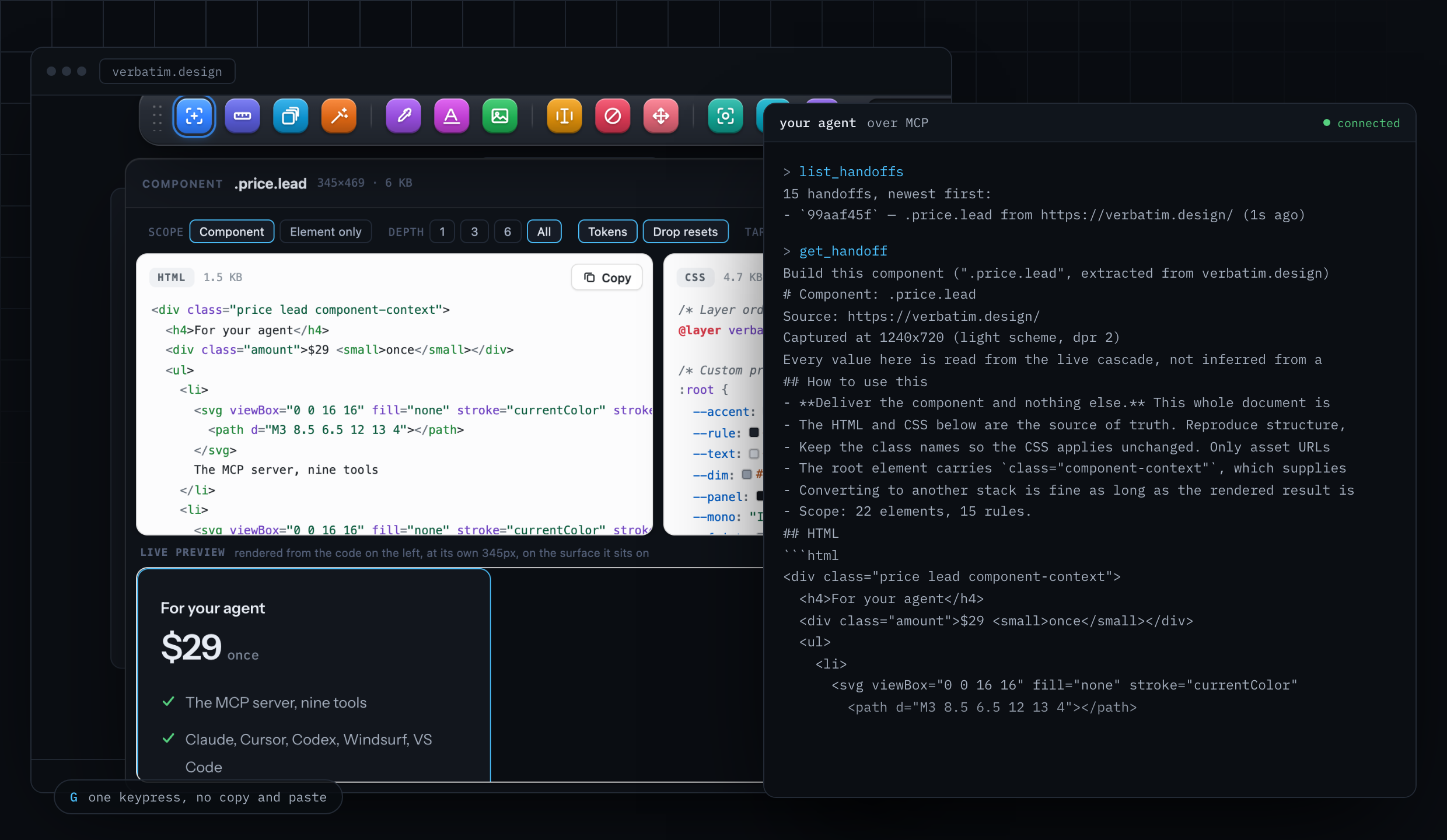
Hand an element you picked to Cursor or Claude Code
G Send to agent in the toolbar, free with no account
The bridge between the two halves. Your agent can fetch a public URL itself, but it cannot log in as you, and it cannot open the menu that the element you want only exists inside. So pick it here and press G.
What you get
- The buildable brief, not a selector
- What arrives is the markup, every rule in cascade order, the tokens, the states, the per-breakpoint behaviour and the contrast.
- Anything you can see
- Behind a login, inside an open menu, on a hover state you are holding, on localhost.
- Loopback only
- The capture goes to a server on your own machine. Nothing leaves it.
- Nothing to configure
- The bridge authorises the extension by its origin, which a web page cannot set, so no page can post to it or read from it. There is no token to paste.
How Verbatim does it
The capture is posted to a bridge listening on loopback only, which authorises the extension by its Origin header, something a web page cannot set. Captures are written as small JSON files in a state directory rather than held in memory, so any server instance can serve what any other received, and a capture survives your client restarting the server.
How to use it
- Install the MCP server:
npx -y verbatim-mcp, or add it to your client in one line. - Pick an element in your browser.
- Press G. The readout confirms the handoff.
- Ask your agent for it: it calls
get_handoff.
What it will not do
- The server has to be running, which normally means your MCP client has started it. If nothing is listening, the readout says so and tells you what to run.
- The extension is free forever. The server is free for 24 hours and then a one time key.
Compared with copy, paste, and hope
The usual loop is: pick something, copy it, switch to the editor, paste it into a chat, describe what you wanted. Every step is a chance to paste the wrong pane or lose the context that made the extraction meaningful.
Press G and the capture is posted to a bridge listening on loopback only, which authorises the extension by its Origin header, something a web page cannot set. Your agent reads it with get_handoff. Nothing is pasted, nothing traverses the internet, and nothing else on your machine can read the queue.
When to use this one
Use Send to agent when your agent cannot reach the page: anything behind a login, and any element that only exists while a menu is held open. For public pages the agent can fetch for itself, point it at the URL and let the MCP server do the extraction without you in the loop.
Questions about Send to agent
What do I need installed for this to work?
The MCP server on the machine you are working on, started by your agent the way any MCP server is: npx -y verbatim-mcp. The extension finds it on loopback and posts to it. Nothing else to configure.
Which coding agents can read the handoff?
Anything that speaks MCP over stdio: Cursor, Claude Code, Claude Desktop, Codex CLI, Windsurf, and VS Code with Copilot in agent mode.
Is my page exposed to other software on my machine?
No. The bridge listens on loopback only and authorises the extension by its Origin header, which a web page is not permitted to set, so a page that probes your local ports cannot read your captures or plant one.
What happens if the server is not running?
The readout says so rather than failing silently. Start the server and press G again; nothing is lost.
Why not let the agent just fetch the URL?
For a public page it can, and should. The handoff exists for the pages it cannot reach: a dashboard behind a login, a checkout, or a dropdown that only exists while you hold it open.
Already have it? The first thirty seconds covers the shortcut, all thirteen keys and what to do if something does not work.