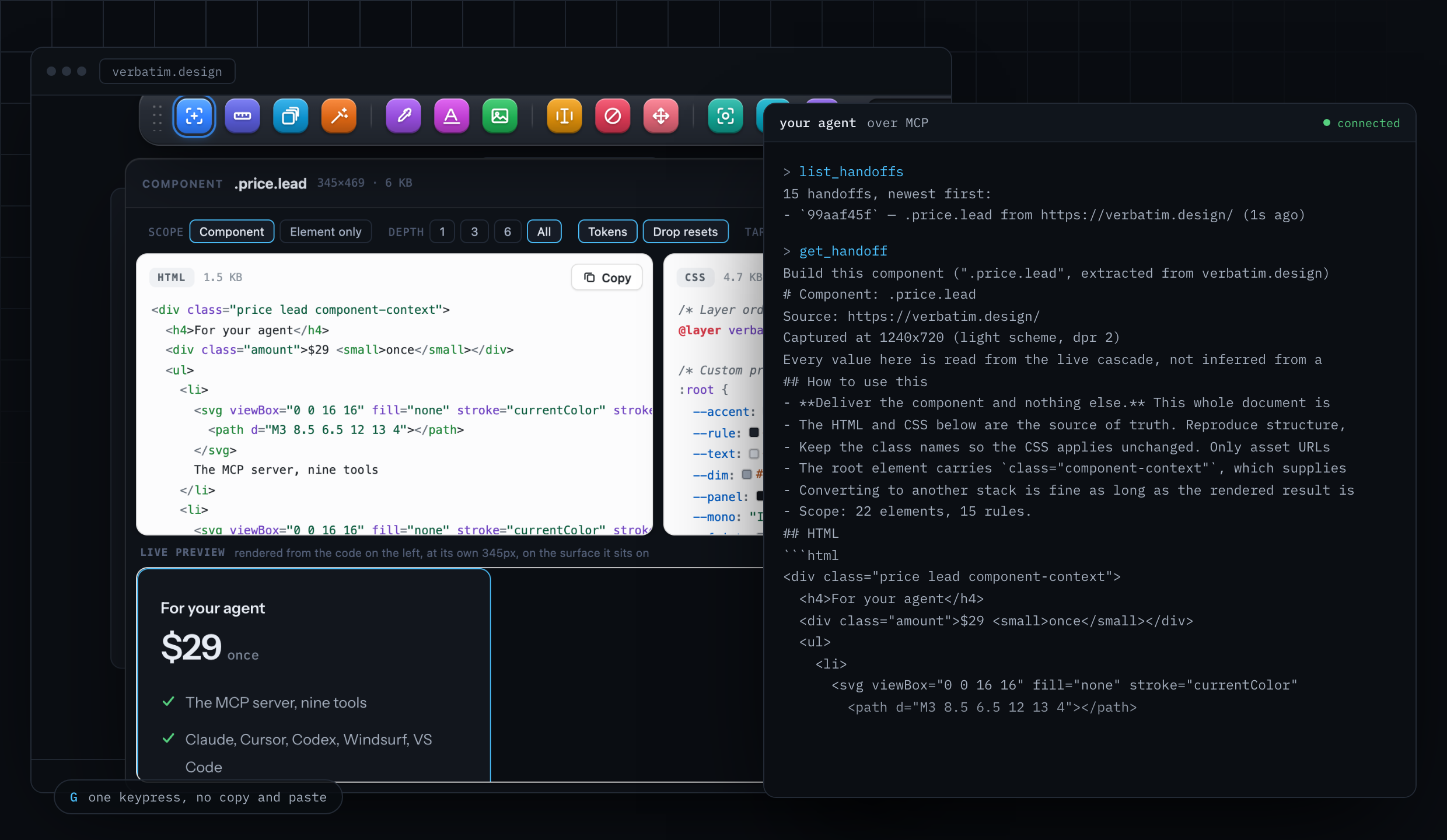
Point at anything. Get the exact code. Hand it to your AI.

Verbatim is the design layer your AI does not have. A Chrome extension that pulls the real design out of any website, and an MCP server that hands your coding agent the same thing: exact values, verified against the page they came from.

  • P Pick element
  • M Measure
  • D Design system
  • C Sample a colour
  • F Fonts in use
  • I Images and SVGs
  • E Edit text
  • X Hide elements
  • V Move elements
  • S Screenshot
  • W Save page HTML
  • G Send to agent

The whole toolbar, one keystroke away on any page.

your agent, mid-task
you Make our pricing card match the one on stripe.com.
agent
get_design_context({
  url: "stripe.com",
  selector: ".pricing-card"
})
verbatim
34 rules across 12 elements
8 tokens, 3 states, 2 breakpoints
contrast 8.4:1, passes AAA
agent
// before trusting any of it
verify_extraction({
  url: "stripe.com",
  selector: ".pricing-card"
})
verbatim
22 of 22 properties match
rendered in isolation, diffed against the live page

Your agent has every layer but this one.

the design layer

It can read your code and query your data. Ask it what colour the button is on a site you admire and it is back to guessing from a picture.

code Your repository. Files, history, types, tests. it reads this
data Your database and your APIs. Schemas, rows, responses. it queries this
design The live page. Cascade, tokens, states, breakpoints, type, assets.Verbatim a screenshot, at best

Verbatim is that third row. One call and the design stops being a picture and becomes something your agent can read: the rules that actually applied, in the order they applied, with the values it would otherwise invent.

Your AI has two bad options.

the problem

Show it a screenshot and there are no values in it. Paste the stylesheet and there are five thousand rules in it. Either way it guesses, and you find out in review.

A screenshot

no values
a picture of a button
#2E6FF2 or #2F6DF6?
13px or 14px?
what happens on hover?
Pixels carry no tokens, no states, no breakpoints. The model invents the numbers.

The whole stylesheet

no signal
.mt-1 { margin-top: .25rem }
.mt-2 { margin-top: .5rem }
.mt-3 { margin-top: .75rem }
.flex { display: flex }
/* 5,768 more rules, 4 of
   which touch your element */
Thousands of rules, no way to tell which applied. It floods the context and buries the answer.

Verbatim

resolved
/* only what applies, in order */
.pricing-card {
  padding: var(--space-6);
  background: #0b69ff;
}
.pricing-card:hover {  }
@media (min-width: 768px) {  }

It works on the page, not in a popup.

the extension

Pin Verbatim, open any website, and hit Alt+Shift+P. A toolbar drops onto the page and stays there while you click around. A popup would close the moment you touched the thing you came for.

  1. first

    Turn it on anywhere

    The icon or the shortcut, on any page including your own localhost. The toolbar lives in a shadow root, so the site's CSS cannot reach into it and it cannot leak into the site. Drag it out of the way by the grip.

  2. then

    Point at what you want

    Hover and the element is outlined, with its selector and its exact size in the toolbar's readout. Click to lock it. It reads through shadow roots and iframes on the same origin, so web components are pickable too.

  3. finally

    Take it, five ways

    The panel opens with the CSS, the same thing in Tailwind, a component in your framework, a written brief for a chat, and the raw inspection. Copy any of it, or press G to send it straight to your coding agent.

Press Esc and it leaves. Anything you hid comes back, anything you moved goes back where it was, and the page is as you found it. Chrome, Edge, Brave and Arc. No account, and no page you visit is sent anywhere.

Add to Chrome

Twelve tools, one key each.

the toolbar

Grouped by what each one does to your page rather than alphabetically, in the order you tend to reach for them. The bar carries a readout of whatever is under the cursor, so it behaves like an instrument with a display instead of a row of buttons.

point at things

P

Pick element

Hover to outline, click to lock. It takes the whole component by default, the element and everything inside it, not one lonely tag. That is why what you paste actually renders.

M

Measure

The box model shaded in place, margin, border and padding separately, with rulers running out to the edges of the viewport. Width and height to the pixel in the readout.

D

Design system

The whole page at once. Palette ordered by how much of the screen each colour actually covers, with background, surface, text, accent and border named. Type scale with the weights and use counts. Spacing, radii, shadows, breakpoints, the site's own custom properties, and a contrast check on the text.

take one thing

C

Sample a colour

Chrome's own eyedropper, so it reads any pixel on the screen including inside images, canvas and video, which no amount of CSS reading can do. Copied as hex, rgb or oklch, whichever you set.

F

Fonts in use

Every family on the page, webfont or system, each size with the weights it appears in and how many times it is used, plus the file each webfont was loaded from.

I

Images and SVGs

Every image, inline SVG, CSS background and video poster on the page, largest first, filterable by format and by rendered size.

change the page

E

Edit text in place

Click any text and type over it. Real copy in a real layout, before anyone builds it.

X

Hide elements

Click to remove a cookie banner, a sticky header, a chat bubble, an ad. Z brings them back one at a time.

V

Move elements

Drag anything anywhere. It moves by transform rather than by changing layout, so nothing around it reflows and putting it back is exact.

take it with you

S

Screenshot

Our own toolbar hides itself and waits for the page to repaint before the shutter, so it never lands in your capture. Cropped to the selection if you have one, otherwise the viewport, named after the element.

W

Save page HTML

The whole page as it stands right now, cookie banner dismissed and menu open, as one downloadable file next to its styles and a live preview.

G

Send to agent

Posts the full design context to the Verbatim server running on your machine. Your agent picks it up with get_handoff, no copy and paste in between.

and two more

,

Settings

Box model shading and distance rulers on or off, colour format, whether picking means the component or the element alone, whether reset rules are dropped, whether design tokens come along, Tailwind v3 or v4 and whether to generate a theme, TypeScript, and your bridge token.

Esc

Close

Puts everything back and gets out of the way.

One thing picked, five ways out.

the panel

Pick an element and the panel opens beside it. Every tab is the same selection seen differently, and every one of them copies with a single button.

CSS

Every rule that applies, in cascade order, with @layer, @media and @supports kept intact, hover and focus states included, and the custom properties the rules read declared alongside. Authored rules, not a dump of computed style.

Tailwind

The same selection as utility classes, v3 or v4, with an optional theme so the classes point at named tokens instead of repeating raw values.

Component

React, Vue, Svelte, Astro, Angular or plain HTML, in JavaScript or TypeScript, with a depth control that runs from the element alone to the entire subtree.

AI context

A written brief for a chat: what the thing is, its values, its states, its breakpoints, the tokens it depends on, its contrast. Rendered as formatted markdown so it is readable before you paste it.

Inspect

The raw reading. Tag, classes, id, box model to a tenth of a pixel, how many rules matched, which states and breakpoints exist, pseudo-elements, web fonts, animations, then the matched selectors sorted by specificity with their layer and at-rule context.

Three of the heavier jobs get their own window, because a side panel is the wrong shape for code you actually need to read. Each one drags, resizes, and reopens where you left it.

Component

Code, and proof it renders

The markup and styles on one side. On the other, the extraction rendered in a sandboxed iframe with the live element's computed values diffed against it, and anything that disagrees listed by name. Switch to Prompt for the brief.

Page clone

The whole page, cleaned up

The captured markup and the page's stylesheets in their own panes, with a preview rendered without scripts, and a button that downloads the file.

Assets

Everything it loads, zipped

A grid of every asset with its format and rendered size, filterable, click to select. Copy the URLs, or download the selection as one zip packed in the browser with nothing sent to a server.

What you get back.

the output

Exact values, never rounded to a nearby palette entry. The button below is rendered by the code beneath it, and that code is read from the same stylesheet as the page loads, so the two cannot drift apart.

Live component measuring
CSS read from the stylesheet rendering the button above

          
background#0A0D12
accent#4CC2FF
foreground#E7ECF4
typeInstrument Sans, IBM Plex Mono
spacing4 8 12 14 20 26 32 48
breakpoints760px 900px 960px

Export as a Tailwind theme, CSS custom properties, or W3C design tokens. Contrast is measured while it reads, so your agent does not faithfully reproduce someone else's accessibility bug.

The pages a robot cannot reach.

handoff

Your agent drives a browser with no session and no hands. It cannot log in to your dashboard, and it cannot see a dropdown that only exists while you hold it open. So pick it yourself, in the state you want it, and press G. The extension posts it to the server on your machine and the agent reads it from there.

Nothing is uploaded on the way. The bridge listens on loopback only and refuses anything without the token in your settings, so no page you happen to have open can read your captures or plant one.

Add to Chrome

the handoff
you Pick the invoice row inside your own logged-in dashboard, press G.
agent
get_handoff()
verbatim
# Component: .invoice-row
from app.yourcompany.com
markup, CSS, states, tokens

Eight things your agent can ask for.

mcp server

Everything the toolbar does by hand, your agent can ask for on its own. Same engine, so what it gets back is exactly what you would see picking that element yourself, and any client that speaks MCP works.

Make our pricing card match the one on stripe.com.

the call

get_design_context({
  url: "stripe.com",
  selector: ".pricing-card",
  task: "rebuild it in our stack"
})

what comes back

# Component: .pricing-card
# from stripe.com, captured at 1440x900

## Every rule that applies, in order
.pricing-card { padding: var(--space-6); ... }
.pricing-card:hover { ... }
@media (min-width: 768px) { ... }

## What a stylesheet cannot say
hover is triggered by the card, not the button
contrast 7.1:1, passes AA and AAA

Buildable markup, every rule that styles it in cascade order with layers preserved, the tokens it reads, its states, its behaviour per breakpoint, its contrast.

Responses are shortened here. The real ones are longer and duller, which is the point.

It checks its own work.

verification

Verbatim renders what it copied and compares it against the live page, property by property. If anything is off it says so, before your agent writes a line.

verify_extraction .pricing-card 22 of 22 match
PropertyLive pageExtractedResult
colorrgb(255, 255, 255)rgb(255, 255, 255)match
background-colorrgb(11, 105, 255)rgb(11, 105, 255)match
padding-left26px26pxmatch
border-radius8px8pxmatch
letter-spacing-0.16px-0.16pxmatch

This is not a marketing claim. The same check runs in the test suite on every build, and it has caught real bugs: cascade layers being flattened, and inherited styles outranking the rules they were meant to lose to.

Pick your agent. Paste one line.

setup

The server speaks MCP over stdio, so anything that speaks MCP can use it. It runs on your machine: nothing is uploaded, and no page you copy from is sent anywhere.

Two routes. From source means npm install && npm run build once, then an absolute path to the built server: run pwd in the folder and use that in place of /path/to/verbatim. From npm needs no path at all, and lights up when the package is published.

One command in your terminal, from any directory.

Check it took with claude mcp list. Verbatim's eight tools then show up in /mcp.

Then just ask for it. Match the hero on linear.app. Take the palette from our marketing site and apply it to this dashboard.

Free tools, no install.

paste a url

Paste a URL, get an answer. No install.

Free where it counts.

pricing

Every tool in this category gets the same complaint: too expensive for what it does. So the extension itself is free forever, with no account. Picking, measuring, inspecting, colours, fonts, assets and screenshots, as much as you like. You pay only when you want your agent doing it for you.

Free

$0
  • Pick, measure and inspect, unlimited
  • Colours, fonts, assets, screenshots
  • Every free web tool
Add to Chrome

Pro

$9 / month
  • The MCP server, for your coding agent
  • Framework export and Tailwind conversion
  • Design system and token export
  • Component library, saved and searchable
Start free, upgrade later

Team

$29 / month
  • Everything in Pro, five seats
  • Shared component library
  • Watch a URL, get told when its design changes
Talk to us